Blog
Understanding Common Fault Codes of Photovoltaic Inverters
2026-03-28 | Eric
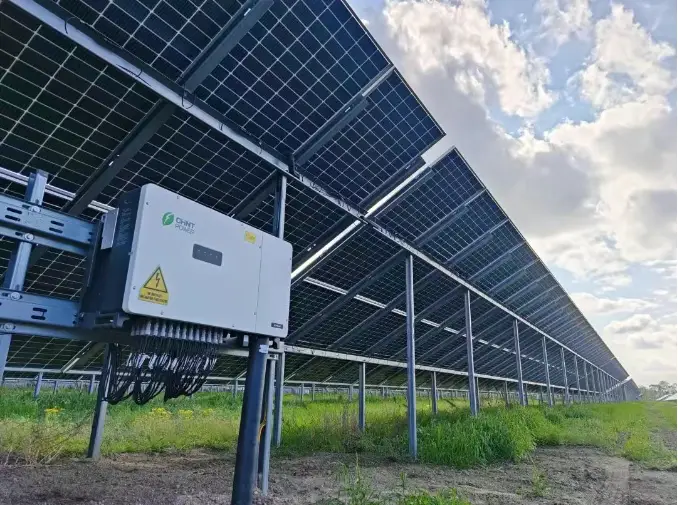
Photovoltaic inverters are the core components of photovoltaic power generation systems. Their failure directly affects the system's power generation efficiency and may even cause shutdowns. Fault codes are key outputs of the inverter’s self-diagnosis, and interpreting these codes helps quickly locate the issue and take corresponding measures. This article consolidates fault codes from major brands such as GoodWe, Sungrow, Huawei, Ginlong, and Growatt, categorizing and interpreting them by fault type. It also provides a general troubleshooting process and preventive suggestions to help users efficiently troubleshoot faults.
Common Fault Types and Code Interpretation
Photovoltaic inverter faults are mainly divided into five categories: DC-side faults, AC-side faults, temperature and cooling faults, communication and software faults, and insulation and leakage current faults. Below are typical codes, meanings, possible causes, and troubleshooting suggestions for each type of fault:
- DC-side faults: approximately 30%
- AC-side faults: approximately 25%
- Temperature and cooling faults: approximately 20%
- Communication and software faults: approximately 15%
- Insulation and leakage current faults: approximately 10%
(1) DC-side Faults (approximately 30%)
| Brand | Fault Code | Meaning | Possible Causes | Troubleshooting Suggestions |
|---|---|---|---|---|
| GoodWe | F01 | DC voltage too high on PV1/PV2 | Too many modules in series (exceeding inverter's maximum input voltage); low temperature causing open-circuit voltage rise | Reduce the number of modules in series; select an inverter with a wide input voltage range (e.g., 1500V models) |
| Sungrow | E002 | DC over-voltage | Too many modules in series; high open-circuit voltage at night | Same as above |
| Huawei | 2001 | String voltage too high | String open-circuit voltage exceeds inverter's maximum working voltage | Check string configuration to ensure open-circuit voltage ≤ maximum input voltage of inverter |
| Ginlong | E011 | DC over-voltage | Modules exceed maximum voltage; internal inverter fault | Adjust string configuration; contact the manufacturer for repair |
| Growatt | - | DC over-voltage protection | Module open-circuit voltage too high (due to low temperature); improper system configuration | Check module temperature coefficient and adjust the number of modules in series |
Note: DC over-voltage is a common fault in winter (low temperatures cause module voltage to rise). Pay special attention to the matching of module string quantities with the inverter's voltage.
(2) AC-side Faults (approximately 25%)
| Brand | Fault Code | Meaning | Possible Causes | Troubleshooting Suggestions |
|---|---|---|---|---|
| GoodWe | F02 | Output voltage too high | Grid voltage fluctuations; inverter output circuit fault | Check grid voltage (using a multimeter); contact the power company to adjust the transformer tap |
| Sungrow | E010 | Grid connection failure | Abnormal grid voltage (>264V or <198V); incorrect phase sequence; grid connection switch not closed | Measure grid voltage, adjust phase sequence; close the grid connection switch |
| Huawei | 2032 | Grid power failure | Grid power outage; AC line disconnected | Check AC line switch; wait for the grid to recover |
| Ginlong | E006 | High grid voltage | Grid voltage exceeds inverter's rated value | Contact the power company; check for internal inverter faults |
| Growatt | - | High grid voltage | Voltage fluctuations at the end of the grid; insufficient transformer capacity at the connection point | Install a voltage stabilizer; contact the power supply bureau to coordinate voltage |
Note: Voltage fluctuations are common in rural grid connections or lightly loaded networks. It’s essential to check the grid voltage health at the connection point in advance.
(3) Temperature and Cooling Faults (approximately 20%)
| Brand | Fault Code | Meaning | Possible Causes | Troubleshooting Suggestions |
|---|---|---|---|---|
| GoodWe | - | Over-temperature protection | Poor ventilation at installation site; fan failure; ambient temperature >40°C | Clean dust from ventilation holes; replace the fan; improve ventilation (e.g., add a sunshade) |
| Sungrow | E020 | Heatsink over-temperature | Fan failure; blocked ventilation holes; ambient temperature >45°C | Same as above |
| Huawei | 2063 | Temperature too high | Poor installation site ventilation; ambient temperature exceeds the maximum allowed value | Check the installation environment, ensure no obstructions nearby (minimum 10cm from walls) |
| Ginlong | - | Over-temperature protection | Inverter exposed to direct sunlight; fan abnormal | Move the inverter to a shaded location; check the fan wiring |
| Growatt | Warning 100 | Fan alarm | Fan blocked by foreign objects; fan failure | Clear foreign objects from the fan; manually rotate the fan and restart the inverter |
Note: Inverters should be installed in well-ventilated areas, away from direct sunlight, with at least 10 cm of space around them.
(4) Communication and Software Faults (approximately 15%)
| Brand | Fault Code | Meaning | Possible Causes | Troubleshooting Suggestions |
|---|---|---|---|---|
| GoodWe | - | No data on monitoring | WiFi/4G module not connected; weak router signal; incorrect communication parameters | Restart the module; check WiFi password/APN settings; install a signal amplifier |
| Sungrow | E030 | No communication connection | Communication module not connected; server failure | Restart the inverter; check Sungrow cloud platform status |
| Huawei | 61440 | Monitoring unit failure | Communication module failure; loose wiring | Contact the dealer for troubleshooting |
| Ginlong | E031 | Internal communication fault | Inverter and monitoring system communication line issue | Check the communication line; restart the inverter |
| Growatt | - | No data on monitoring | WiFi module not properly connected; SIM card not recharged | Reinsert the WiFi module; check the SIM card status |
Note: Real-time fault records can be viewed via the manufacturer's app (such as Huawei FusionSolar or Growatt ShinePhone) to anticipate communication issues.
(5) Insulation and Leakage Current Faults (approximately 10%)
| Brand | Fault Code | Meaning | Possible Causes | Troubleshooting Suggestions |
|---|---|---|---|---|
| GoodWe | F07 | Insulation impedance too low | Damaged DC cable; module frame not grounded; humid installation environment | Use a megohmmeter to measure the string-to-ground resistance (>50kΩ); check the module grounding |
| Sungrow | E004 | DC grounding fault | Damaged DC cable insulation; module frame grounding resistance >4Ω | Replace damaged cables; repair grounding connections |
| Huawei | 2062 | Insulation impedance low | Photovoltaic string shorted to protective ground; humid environment | Disconnect strings and check one by one; rectify fault points (e.g., replace damaged connectors) |
| Ginlong | E031 | DC-side grounding fault | Grounding resistance exceeds rated value | Check DC connection lines; replace damaged DC switch |
| Growatt | - | Insulation fault | Damaged string line; water ingress in module | Use a shake table to test the AC line-to-ground impedance; replace faulty strings |
Note: Insulation faults are more likely in rainy or humid environments. Regularly check the module frame grounding and cable insulation.
General Fault Troubleshooting Process
Regardless of the brand or model, inverter faults can be investigated using the following standardized process:
- Record fault information: Read the complete fault code (e.g., "E001"), fault time, and environmental temperature (e.g., "35°C") from the LCD screen or monitoring app for later reference.
- Initial inspection:
- Inspect the inverter for any visible signs of damage, such as burnt marks, a stopped fan, or loose wiring.
- Measure key parameters: Use a multimeter to measure DC input voltage (≥ inverter startup voltage, e.g., 100-150V) and AC output voltage (220V±10%/380V±10%).
- Process according to the code:
- DC-side faults (e.g., E001/E002): Check the string quantity and wiring polarity.
- AC-side faults (e.g., E010/E011): Measure grid voltage and check grid connection switches.
- Temperature faults (e.g., E020): Clean ventilation holes and improve ventilation.
- Communication faults (e.g., E030): Restart the module and check the network signal.
- Advanced operations:
- Restart the inverter (turn off for 5 minutes, then power on) to clear temporary faults.
- Use the manufacturer’s cloud platform to remotely upgrade firmware (with manufacturer support) to fix software bugs.
- Contact after-sales service: If faults persist or cannot be resolved (e.g., hardware damage), provide the fault code and environmental data to the manufacturer's technical support.
Preventive Maintenance Suggestions
Regular maintenance can reduce inverter fault rates (according to IEA data, performing one professional inspection per year can reduce faults by 60%). The following measures are recommended:
- Regular cleaning: Clean inverter ventilation holes every quarter (use compressed air) to prevent blockages. Use an infrared thermal imager annually to detect IGBT module temperature (normal <75°C).
- Check connections: Inspect DC/AC terminal connections for looseness every six months. Ensure that the grounding wire is secure (ground resistance ≤4Ω).
- Monitor data: Track inverter efficiency curves in real-time via the manufacturer’s app (e.g., PR value). If efficiency drops (e.g., below 80%), promptly check for module shading or inverter faults.
- Environmental control: Install the inverter in a well-ventilated area away from direct sunlight, ensuring at least 10 cm of space around it. In high-temperature environments (>40°C), install a sunshade or air conditioning unit.
- Firmware upgrades: Periodically download the latest firmware from the manufacturer’s official website to optimize MPPT efficiency (e.g., the Growatt 2023 v2.1 firmware fixes the MPPT false reporting issue).
Important Safety Tips
- Safety first: Always disconnect both AC and DC power sources from the inverter before operation (wait for 5 minutes for internal capacitor discharge) to avoid electric shock.
- Avoid self-disassembly: Non-professionals should not open the inverter casing to avoid contact with high-voltage components (e.g., DC-side voltage >600V).
- Use original parts: When replacing parts, always use the manufacturer's original components (e.g., fan, capacitor) to avoid secondary faults caused by incompatible parts.
Conclusion
Photovoltaic inverter fault codes are key to quickly locating issues. Through the categorization of faults (DC-side, AC-side, temperature, communication, insulation) and a standardized troubleshooting process, operational efficiency can be greatly improved. Preventive maintenance, such as regular cleaning and checking connections, is central to reducing faults. It is recommended that users maintain a fault log (recording codes and actions taken) for subsequent analysis and optimization. In the case of complex faults (e.g., damaged IGBT module), always contact a professional service provider to ensure safe and stable system operation.
Popular Articles
Contact Details
Worktime :Monday to Friday 9am - 6pm (HKT)
WhatsApp/Wechat/Mobile :+8613645616165
Email : info@lifepo4cellstore.com